> For the complete documentation index, see [llms.txt](https://docs.peajia.com.tw/llms.txt). Markdown versions of documentation pages are available by appending `.md` to page URLs; this page is available as [Markdown](https://docs.peajia.com.tw/home/help-center/basic/account.md).

# 帳號管理

> #### 快速了解這個單元
>
> * 邀請管理者加入同一個官方帳號（新增帳號）。
> * 編輯管理者的暱稱與信箱。
> * 調整管理者權限。
> * 移除管理者，或退出自己不再管理的官方帳號。

***

## 邀請管理者（新增帳號）

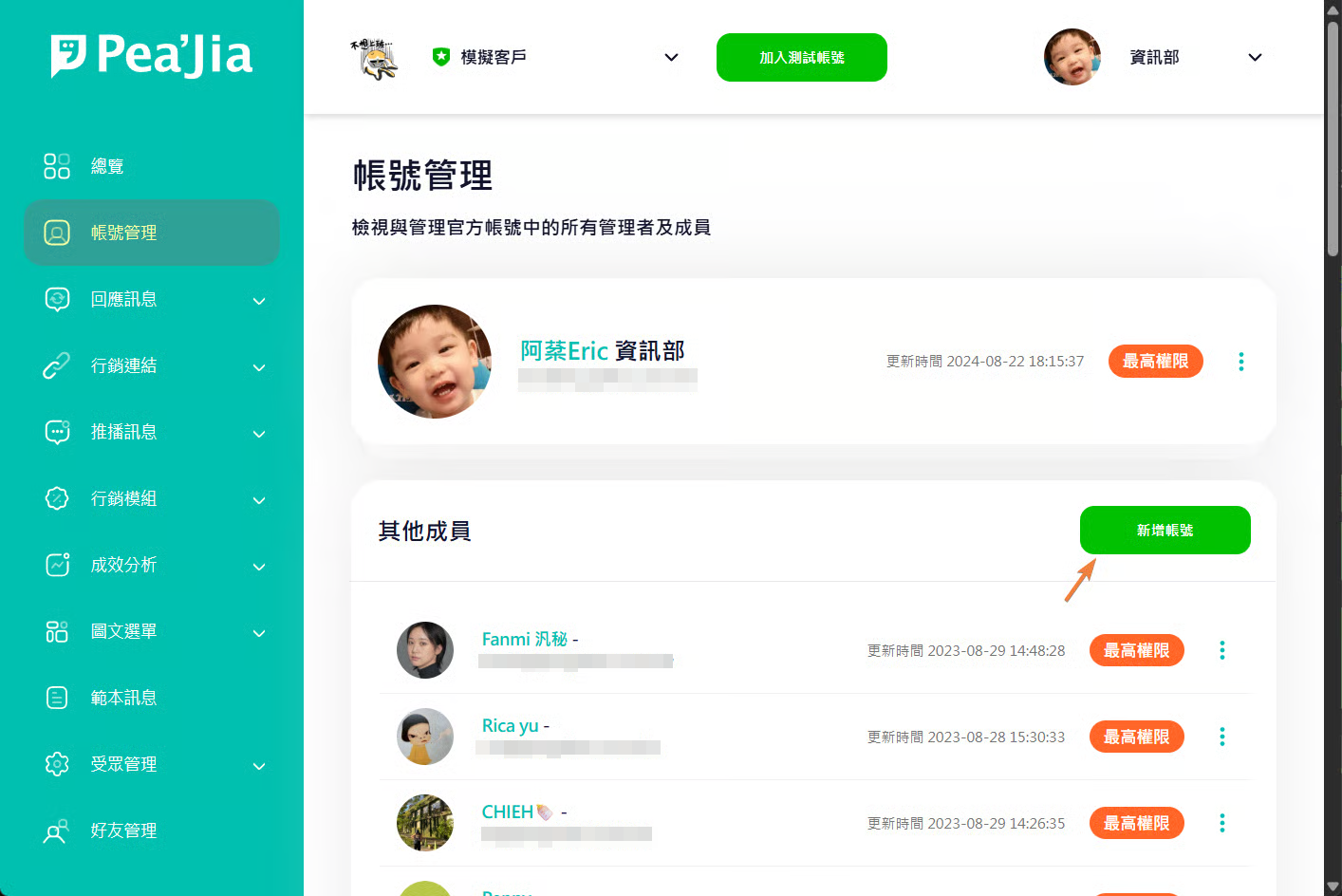
在左側選單開啟「帳號管理」， 點擊「新增帳號」。

<div data-with-frame="true"><figure><img src="/files/Aa6EEoUihmRFG2bu7FMU" alt=""><figcaption></figcaption></figure></div>

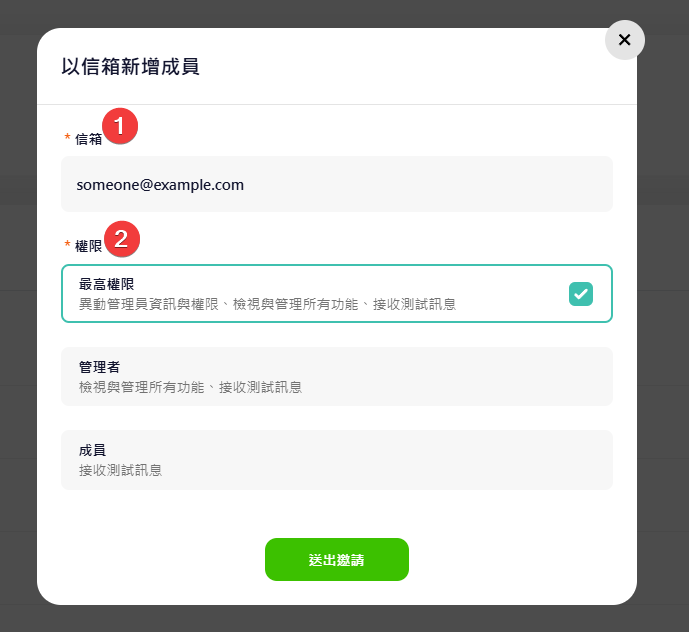
在視窗中輸入對方的電子郵件地址， 接著選擇要賦予的權限。

{% hint style="info" %}
這裡填寫的電子郵件地址，不需要等同 LINE 帳號的電子郵件。
{% endhint %}

<div data-with-frame="true"><figure><img src="/files/MyYdsFFoKIVQFzBhdM2i" alt="" width="517"><figcaption></figcaption></figure></div>

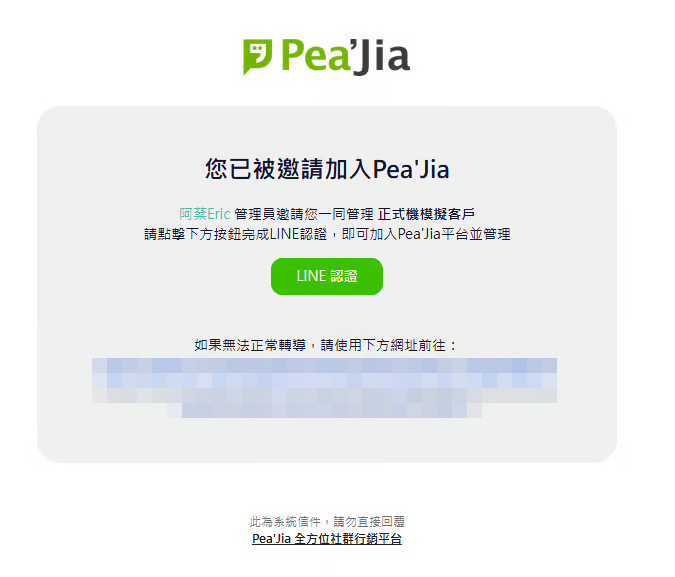
送出後，對方會收到 Pea'Jia 平台邀請信。 請對方點擊信件中的「LINE 認證」按鈕完成驗證。

完成後，對方即可用已認證的 LINE 帳號登入後台： <https://peajia.com.tw/admin>。

<div data-with-frame="true"><figure><img src="/files/9exl7AxlSgHUfhln2JFd" alt="" width="506"><figcaption></figcaption></figure></div>

***

## 管理自己的帳號

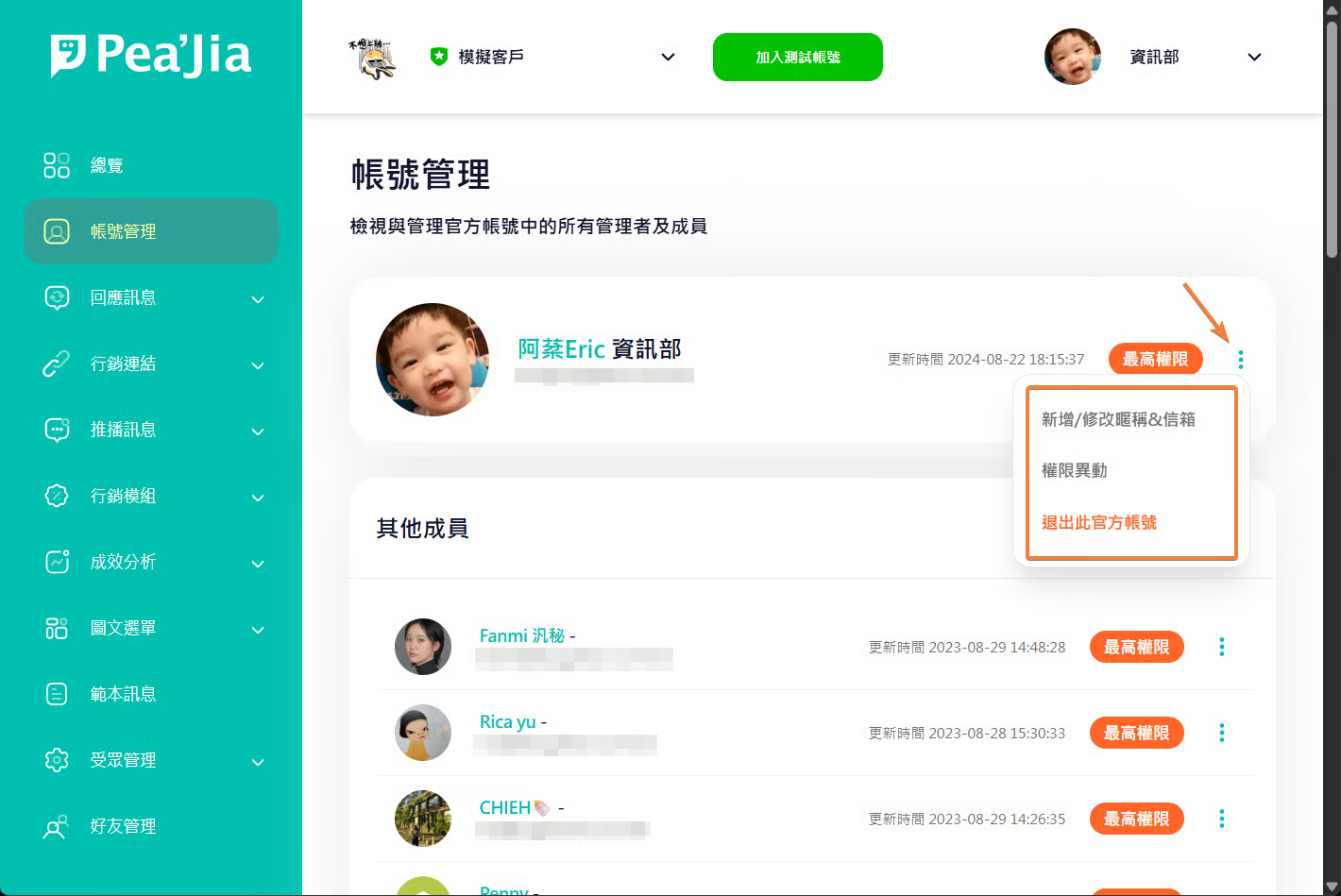
在頁面上方會顯示自己的帳號資訊。 點擊右側選單即可操作。

<div data-with-frame="true"><figure><img src="/files/mzDxZvYpw0gvKBpZHCig" alt=""><figcaption></figcaption></figure></div>

### 更新暱稱與信箱

<div data-with-frame="true"><figure><img src="/files/ebJtxi8qXQrFdRX2KxF1" alt="" width="475"><figcaption></figcaption></figure></div>

#### 修改暱稱

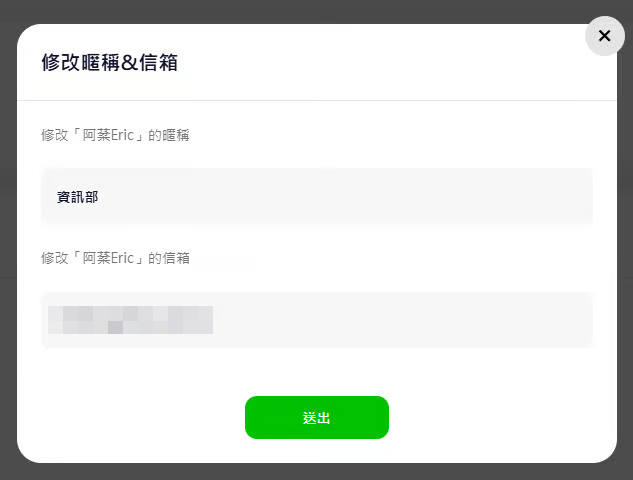
輸入可供快速識別管理者的暱稱

{% hint style="info" %}
邀請管理者加入後，系統會自動帶入管理者在LINE上的暱稱，此LINE暱稱不一定容易識別，亦或者您需要更精確地描述管理者，以利在Pea'Jia中快速識別該管理者
{% endhint %}

#### 修改信箱

Pea'Jia會定期發送更新資訊與官方帳號分析至這個郵件地址

### 權限異動

<div data-with-frame="true"><figure><img src="/files/lLwZe9v1qBIEjYz6oVv6" alt="" width="563"><figcaption></figcaption></figure></div>

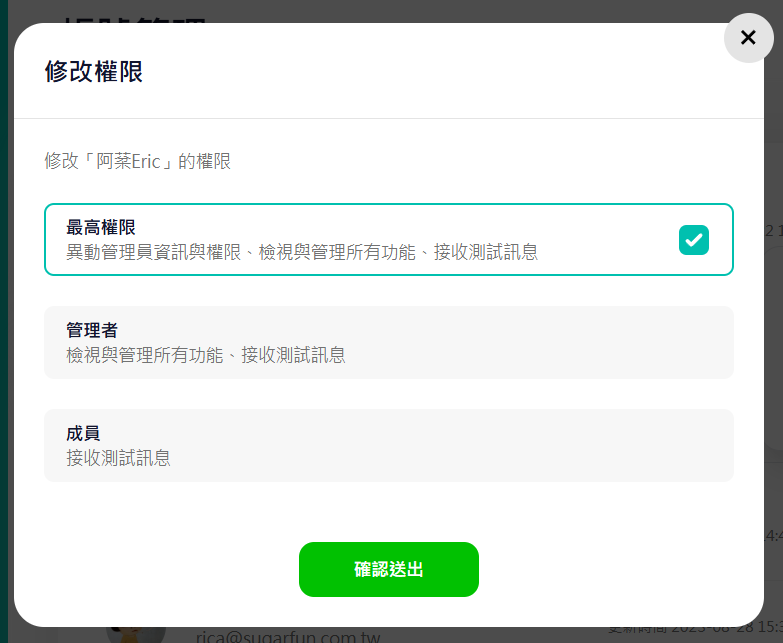
您可根據需要調整目標管理者權限，Pea'Jia中目前有三種權限，分別為：

#### 最高權限

異動管理員資訊與權限、檢視與管理所有功能、接收測試訊息

{% hint style="warning" %}
官方帳號至少需要一位「最高權限」管理者。\
若你是唯一的「最高權限」管理者，系統會阻擋你降低權限。
{% endhint %}

#### 管理者

檢視與管理所有功能、接收測試訊息

#### 成員

接收測試訊息

### 退出官方帳號

當你不再管理此官方帳號，可使用「退出官方帳號」離開。

退出後，你無法自行再次加入。 你只能請其他擁有「最高權限」的管理者重新邀請。

{% hint style="warning" %}
官方帳號至少需要一位「最高權限」管理者。\
若你是唯一的「最高權限」管理者，系統會阻擋你退出。
{% endhint %}

***

## 管理其他管理者

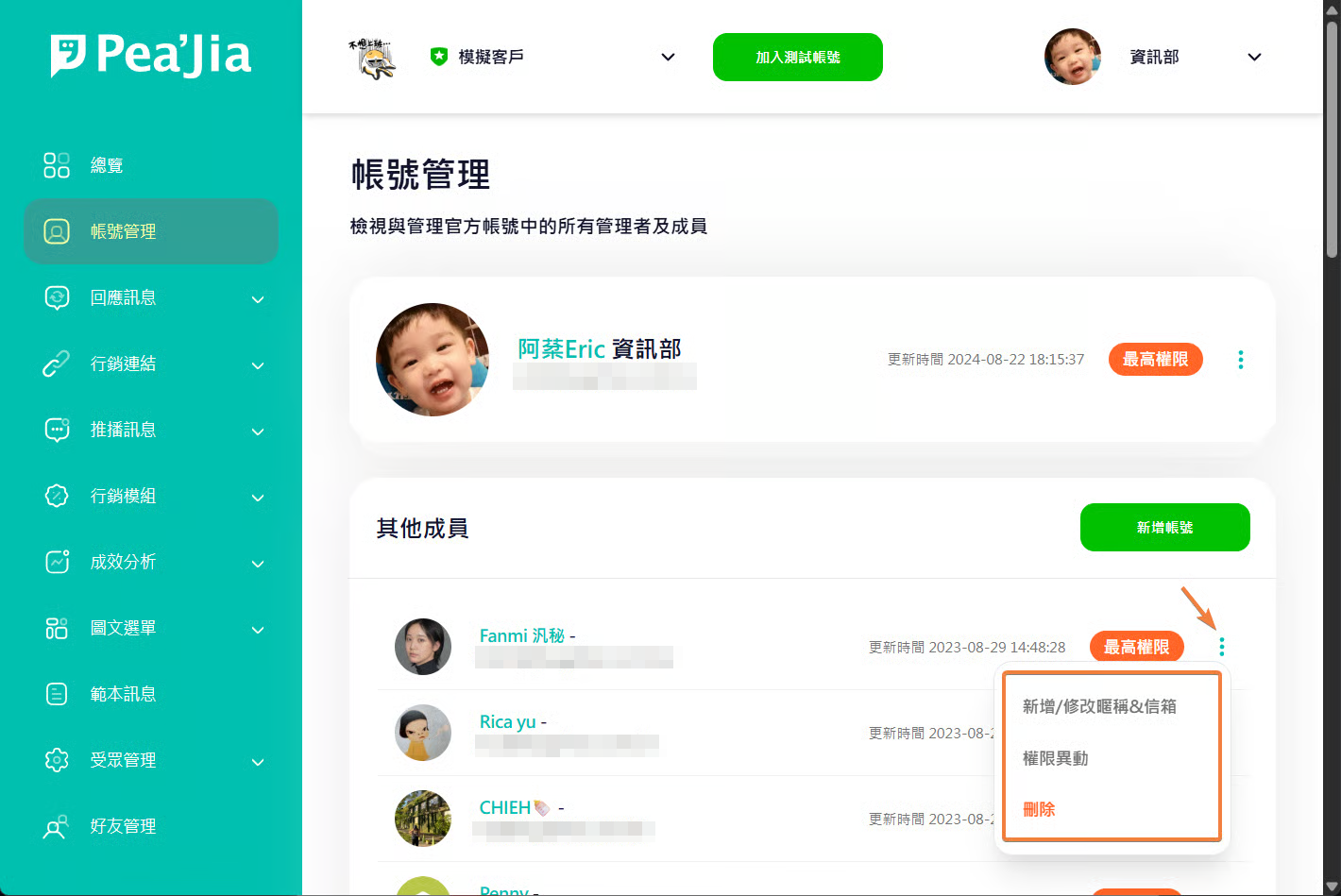
在頁面下方會顯示其他成員的帳號資訊。 點擊右側選單即可操作。

<div data-with-frame="true"><figure><img src="/files/TG5GtbymdZd9F8z6GX9h" alt=""><figcaption></figcaption></figure></div>

### 更新暱稱與信箱

<div data-with-frame="true"><figure><img src="/files/ebJtxi8qXQrFdRX2KxF1" alt="" width="475"><figcaption></figcaption></figure></div>

#### 修改暱稱

輸入可供快速識別管理者的暱稱

{% hint style="info" %}
邀請管理者加入後，系統會自動帶入管理者在LINE上的暱稱，此LINE暱稱不一定容易識別，亦或者您需要更精確地描述管理者，以利在Pea'Jia中快速識別該管理者
{% endhint %}

#### 修改信箱

Pea'Jia會定期發送更新資訊與官方帳號分析至這個郵件地址

### 權限異動

<div data-with-frame="true"><figure><img src="/files/lLwZe9v1qBIEjYz6oVv6" alt="" width="563"><figcaption></figcaption></figure></div>

您可根據需要調整目標管理者權限，Pea'Jia中目前有三種權限，分別為：

#### 最高權限

異動管理員資訊與權限、檢視與管理所有功能、接收測試訊息

{% hint style="warning" %}
官方帳號至少需要一位「最高權限」管理者。\
若你是唯一的「最高權限」管理者，系統會阻擋你降低權限。
{% endhint %}

#### 管理者

檢視與管理所有功能、接收測試訊息

#### 成員

接收測試訊息

### 刪除管理者

若該成員不再管理此官方帳號，可使用「刪除」移除該帳號。

刪除後，若要恢復管理權限，只能重新發送邀請加入。

***

## 延伸操作

* 初次啟用與綁定流程：前往 [如何開始使用Pea'Jia](/home/help-center/start/start-peajia.md)。
* 了解 LINE 登入機制與安全建議：前往 [LINE 帳號登入 Pea'Jia 沒問題嗎？](/home/help-center/start/sso.md)。
* 上線前先驗收內容與流程：前往 [測試帳號是什麼？](/home/help-center/start/test-oa.md)。
* 實際發送預覽並選接收者：前往 [教我使用測試發送](/home/help-center/start/test-send.md)。


---

# Agent Instructions
This documentation is published with GitBook. GitBook is the documentation platform designed so that both humans and AI agents can read, navigate, and reason over technical content effectively. Learn more at gitbook.com.

## Querying This Documentation
If you need additional information that is not directly available in this page, you can query the documentation dynamically by asking a question.

Perform an HTTP GET request on the current page URL with the `ask` query parameter:

```
GET https://docs.peajia.com.tw/home/help-center/basic/account.md?ask=<question>
```

The question should be specific, self-contained, and written in natural language.
The response will contain a direct answer to the question and relevant excerpts and sources from the documentation.

Use this mechanism when the answer is not explicitly present in the current page, you need clarification or additional context, or you want to retrieve related documentation sections.