> For the complete documentation index, see [llms.txt](https://docs.peajia.com.tw/llms.txt). Markdown versions of documentation pages are available by appending `.md` to page URLs; this page is available as [Markdown](https://docs.peajia.com.tw/home/help-center/basic/friend.md).

# 好友管理

> #### 快速了解這個單元
>
> * 查看並編輯單一好友資料（暱稱、電話、生日、Customer ID、備註等）。
> * 手動新增/移除好友標籤，作為分眾與個人化依據。
> * 批次操作：上傳好友標籤、上傳好友資料、匯出 xlsx。

***

## 管理單一好友

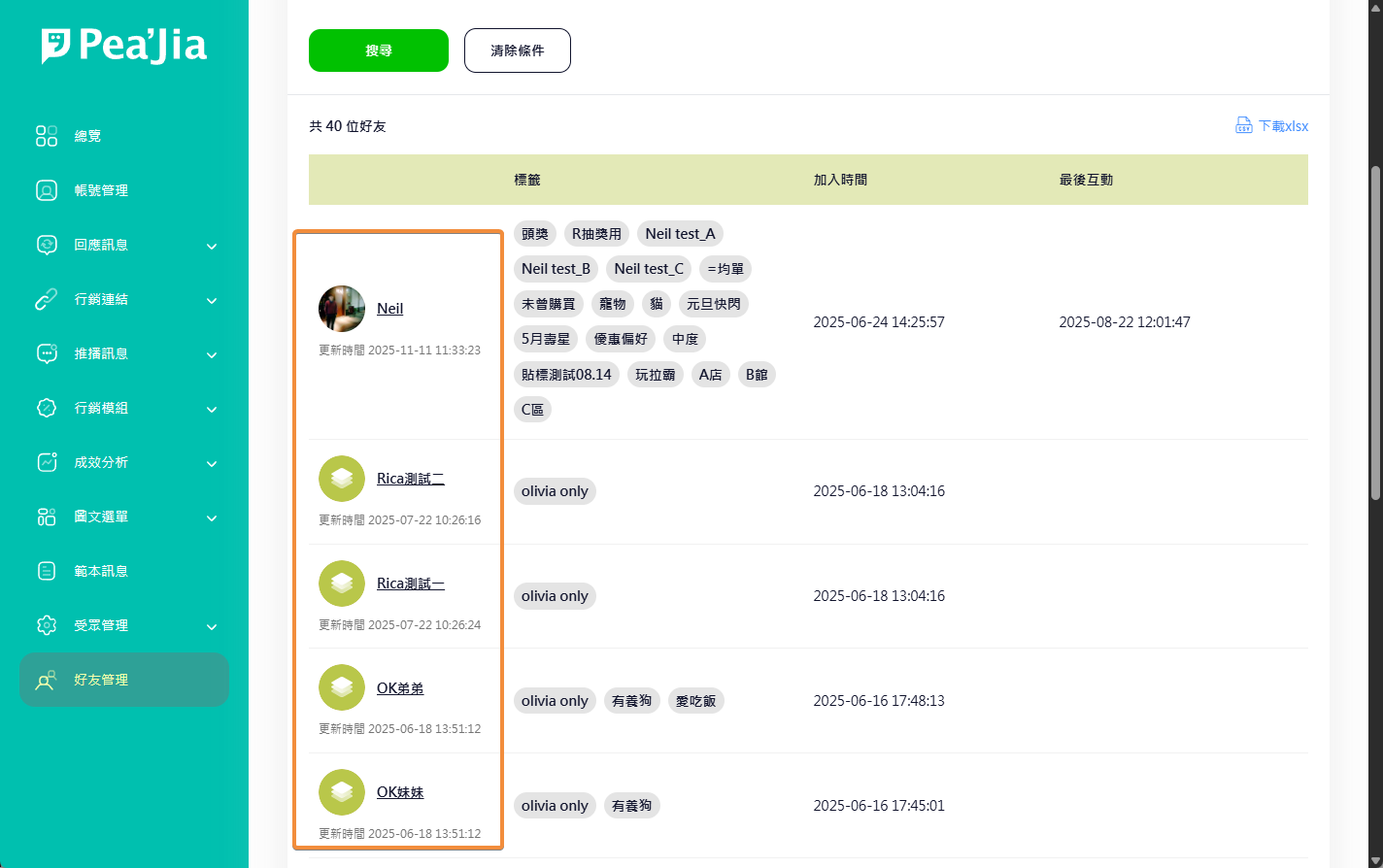
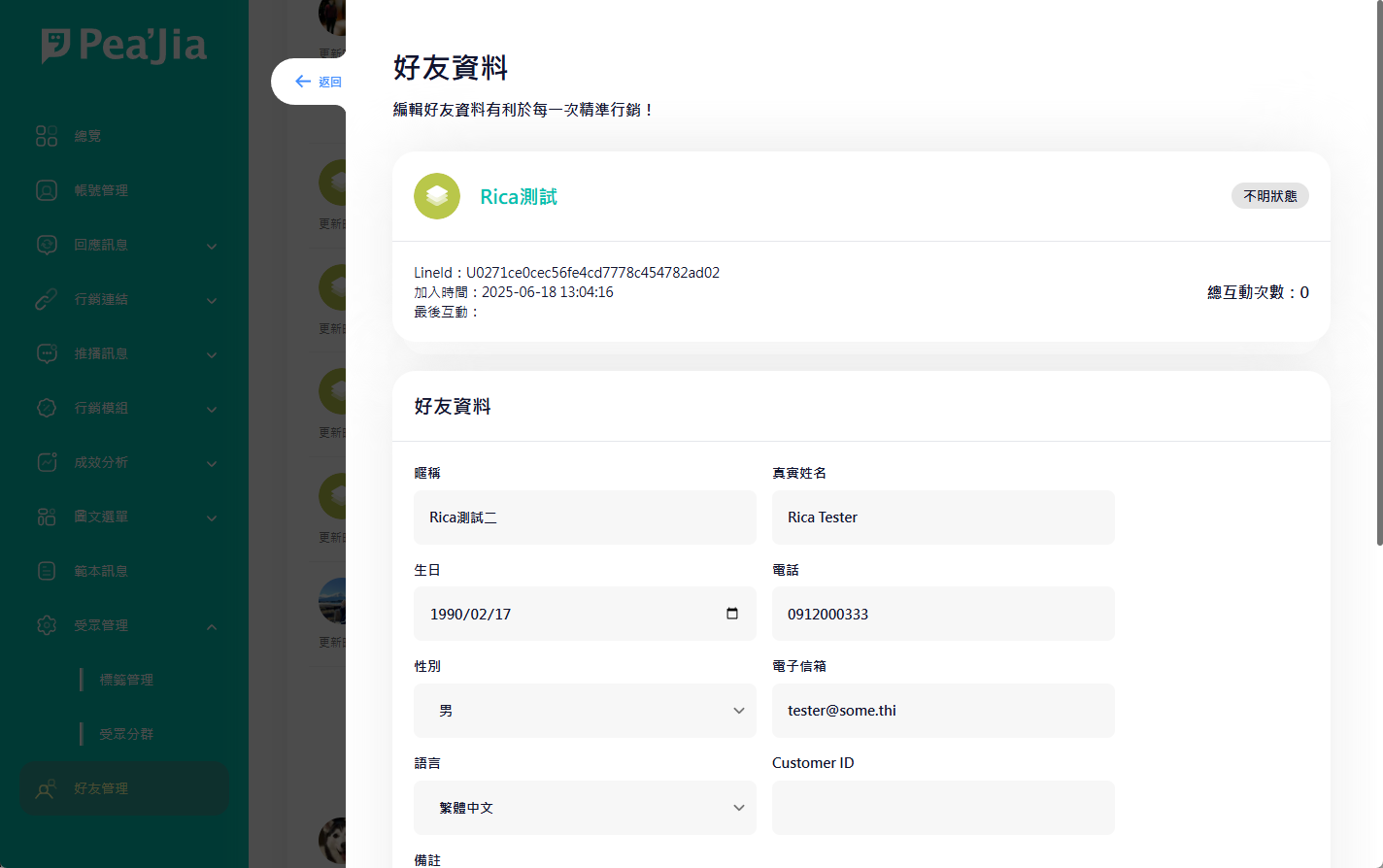
在好友列表點好友名稱，開啟好友編輯視窗。

<div data-with-frame="true"><figure><img src="/files/P98f3bCEvPJn2MD6ohK8" alt=""><figcaption></figcaption></figure></div>

<div data-with-frame="true"><figure><img src="/files/7Xg4jUTDBAOiD21pHPtU" alt=""><figcaption></figcaption></figure></div>

### 可編輯欄位

* **暱稱**：加入官方帳號後自動帶入 LINE 暱稱。
* **真實姓名**：手動維護用戶姓名。
* **生日**：可用於年齡/生日行銷判斷。
* **電話**
* **性別**
* **電子信箱**
* **語言**：加入官方帳號後自動帶入主要語言。
* **Customer ID**：會員 ID 或 CRM 識別值。
* **備註**：內部備註用。

### 手動編輯標籤

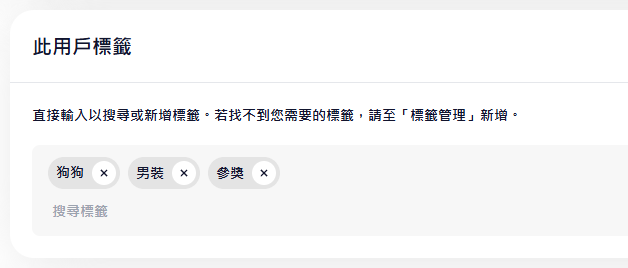
在「此用戶標籤」區塊，手動新增或移除標籤。

<div data-with-frame="true"><figure><img src="/files/kqGR5JT1lQnyUx5HO3qN" alt=""><figcaption></figcaption></figure></div>

{% hint style="info" %}
標籤會用在分眾與內容個人化。規劃方式可參考 [標籤管理](/home/help-center/basic/tag.md)。
{% endhint %}

***

## 批次上傳好友標籤

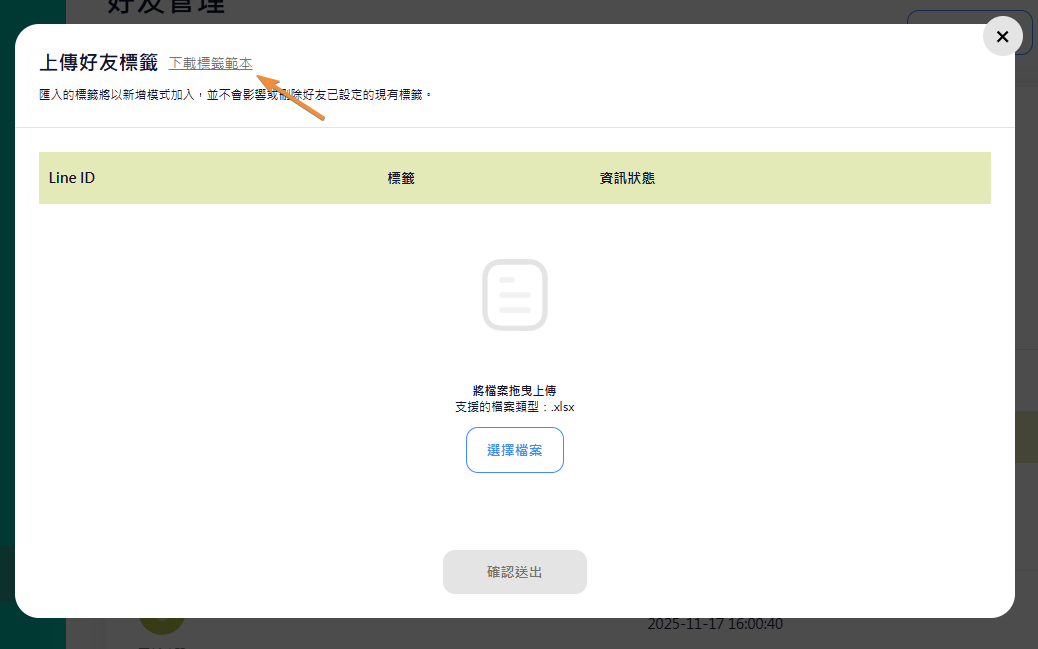
用 xlsx 批次新增好友標籤。

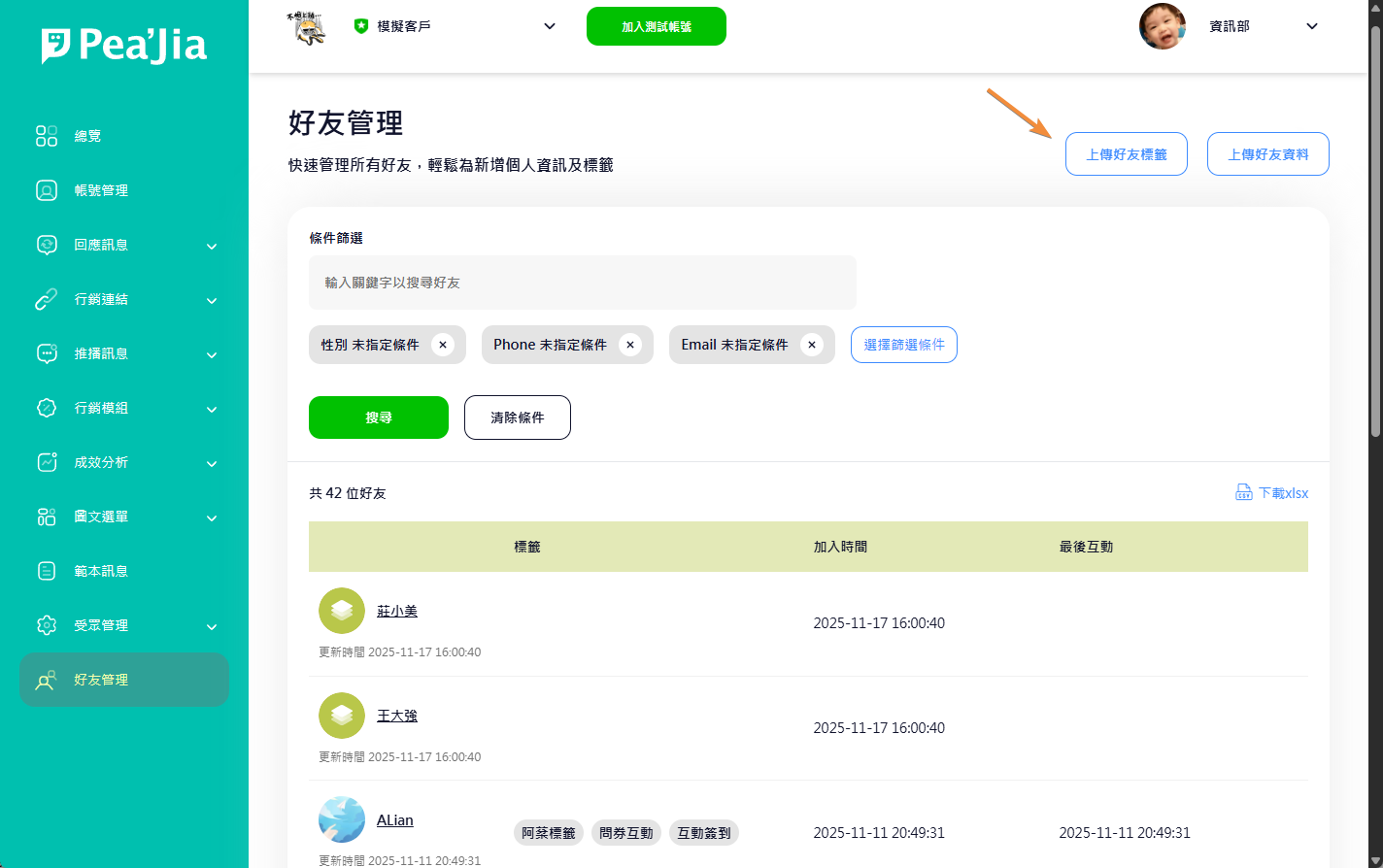
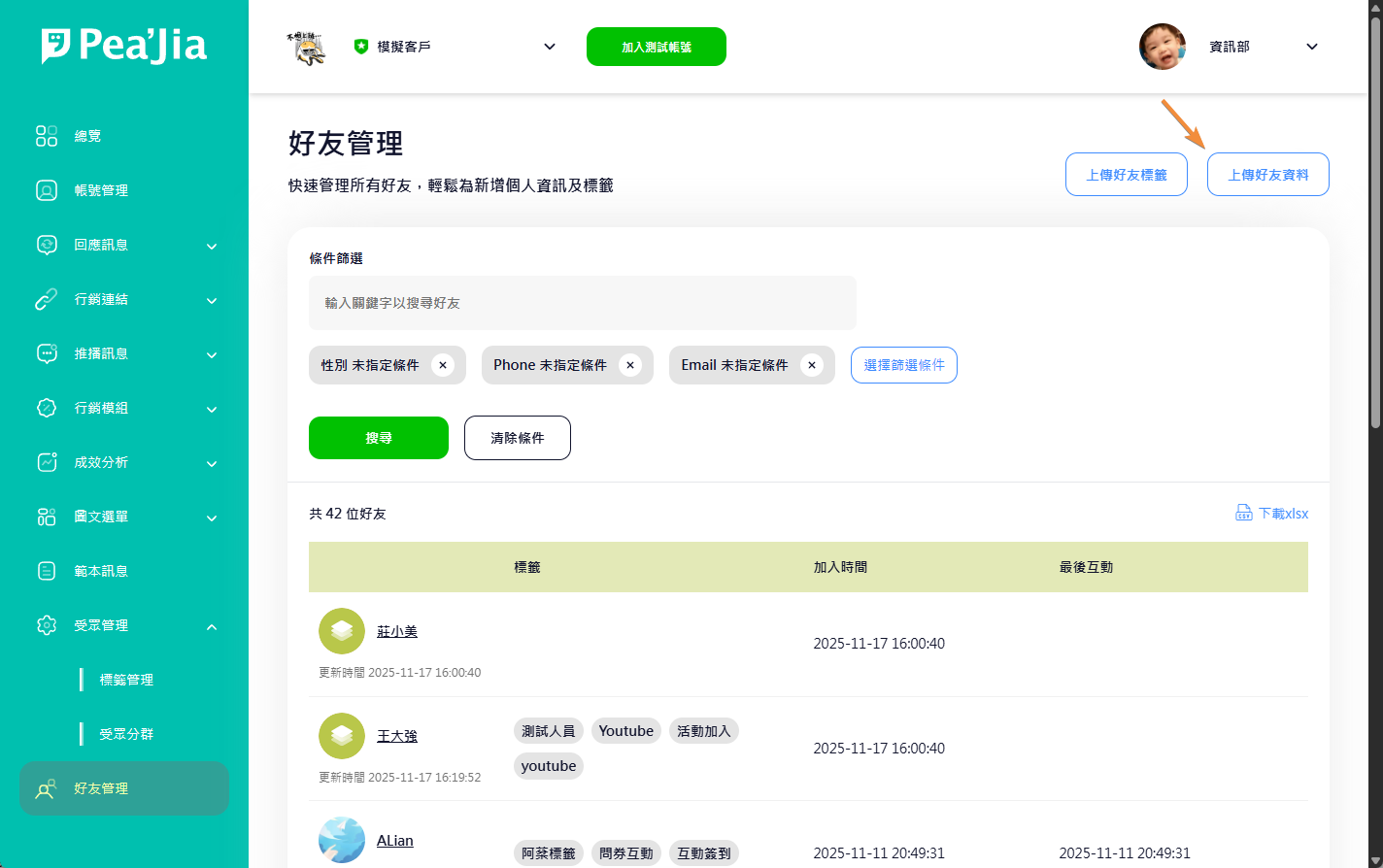
1. 在好友列表右上角點 **上傳好友標籤**。
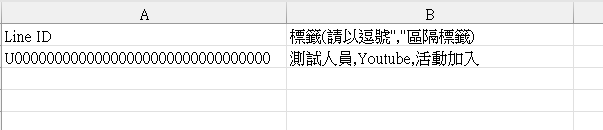
2. 在預覽視窗點 **下載標籤範本**。
3. 依範本格式編輯 xlsx。
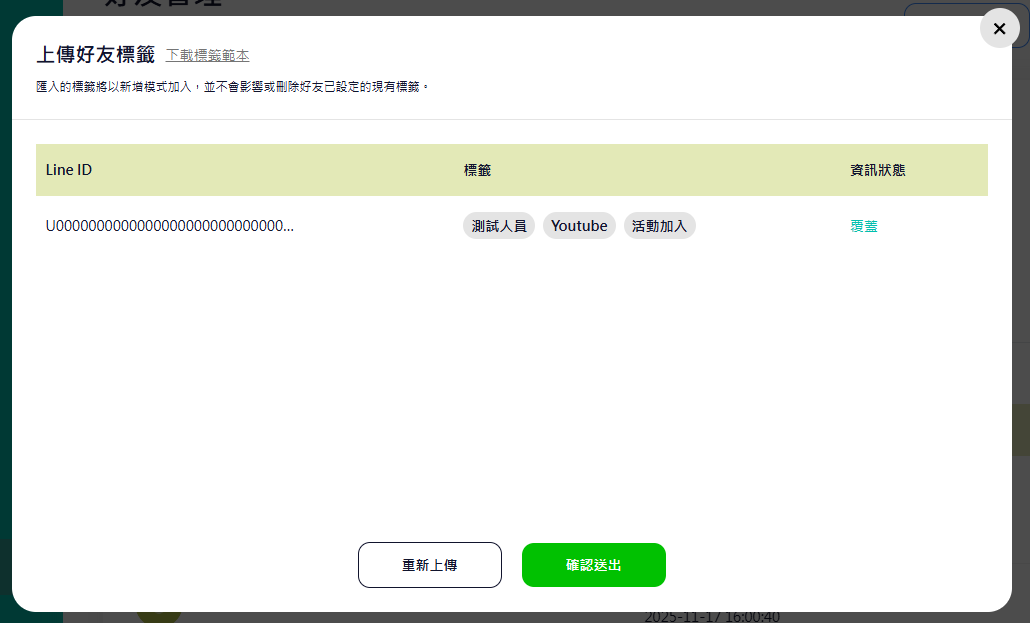
4. 上傳檔案，確認預覽內容後送出。

<div data-with-frame="true"><figure><img src="/files/GV7hCgMT8xSkuyq3S7Jh" alt=""><figcaption></figcaption></figure></div>

<div data-with-frame="true"><figure><img src="/files/TiCmmYYL6toqgno4q0UG" alt=""><figcaption></figcaption></figure></div>

{% hint style="warning" %}
若匯入的標籤不存在，系統會自動建立。\
請特別注意英文大小寫視為相同標籤。
{% endhint %}

{% hint style="warning" %}
匯入會以「新增」為主。\
不會影響或刪除好友既有標籤。
{% endhint %}

<div data-with-frame="true"><figure><img src="/files/Iq2ytrpZv2TpEOYzNnQ9" alt=""><figcaption></figcaption></figure></div>

<div data-with-frame="true"><figure><img src="/files/lApKEFSaNuo6GbfHTStz" alt=""><figcaption></figcaption></figure></div>

***

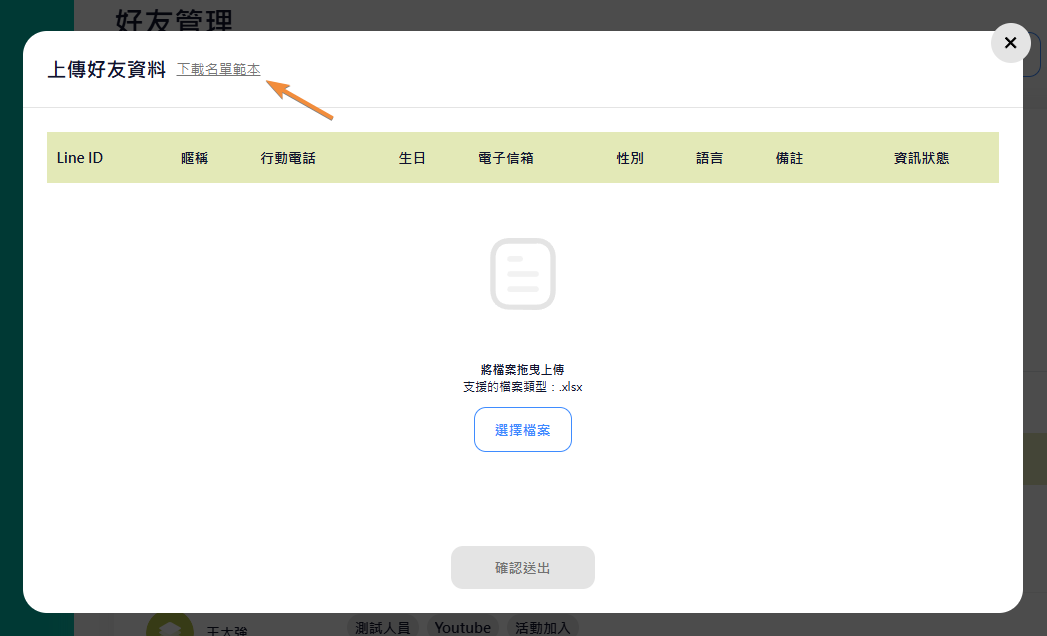
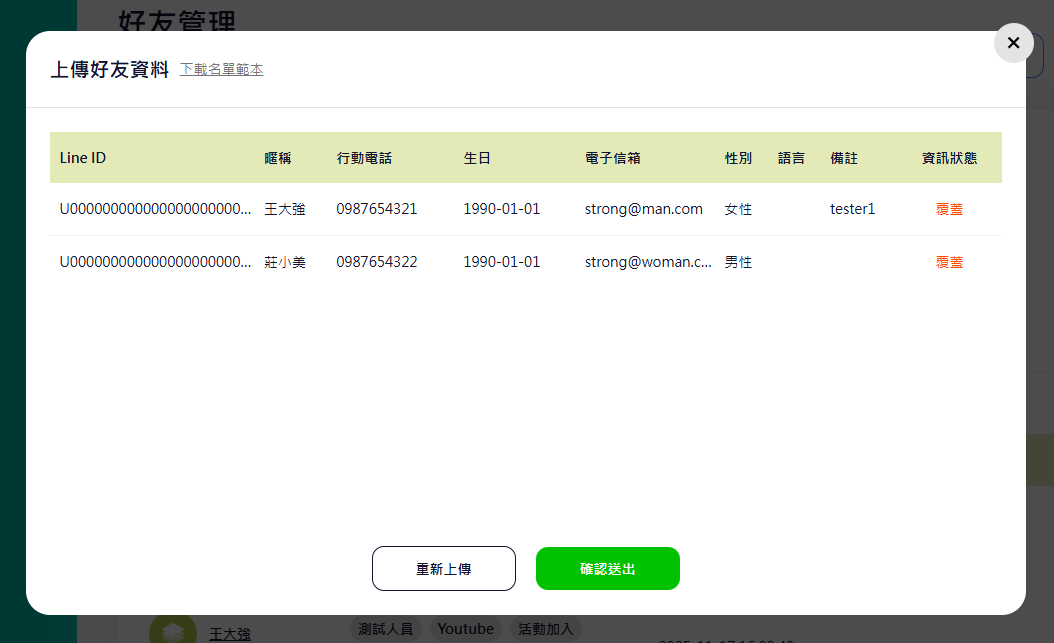
## 批次上傳好友資料

用 xlsx 批次更新好友欄位資料（例如電話、生日、Customer ID）。

1. 在好友列表右上角點 `上傳好友資料`。
2. 先下載資料範本（以視窗內按鈕名稱為準）。
3. 依範本格式編輯 xlsx。
4. 上傳檔案，確認預覽內容後送出。

<div data-with-frame="true"><figure><img src="/files/arFGXR9o34VWhsU1pacU" alt=""><figcaption></figcaption></figure></div>

<div data-with-frame="true"><figure><img src="/files/xgWscEVTm9XgYeRoPeTv" alt=""><figcaption></figcaption></figure></div>

<div data-with-frame="true"><figure><img src="/files/32JtZdKffOo5p7bSEx2U" alt=""><figcaption></figcaption></figure></div>

<div data-with-frame="true"><figure><img src="/files/O6JFzn4PoKc4P4qfkRdZ" alt=""><figcaption></figcaption></figure></div>

***

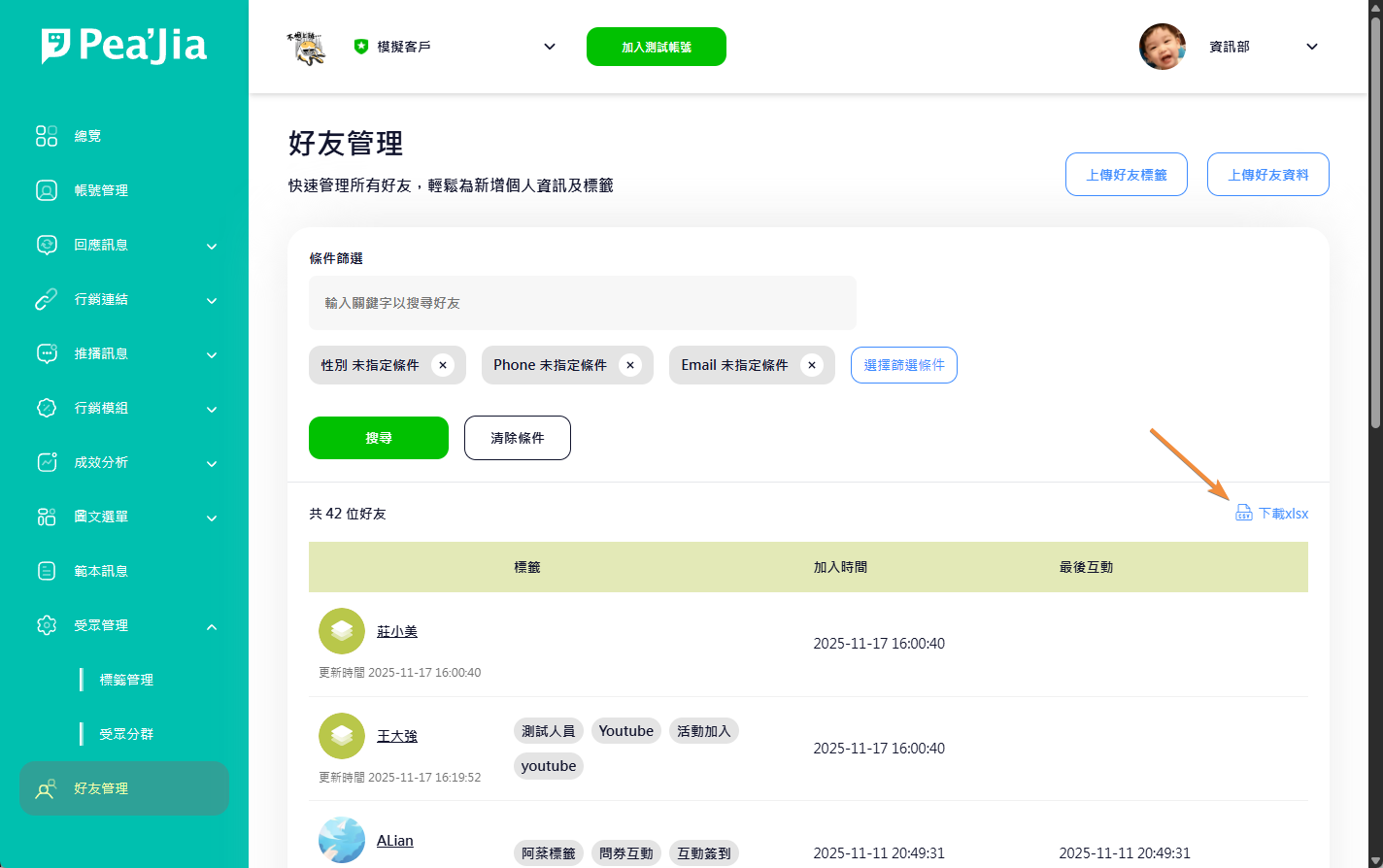
## 匯出好友資料

在好友列表右上角點 `下載xlsx`，即可匯出好友資料。

<figure><img src="/files/DyBlUMVNgcWD4uczqn3d" alt=""><figcaption></figcaption></figure>

***

## 延伸操作

* 用標籤規劃「身份/偏好/來源/行為」：前往 [標籤管理](/home/help-center/basic/tag.md)。
* 用標籤、互動與個人資料組出投放名單：前往 [受眾分群](/home/help-center/basic/audience.md)。
* 把分群套用到活動推送：前往 [推播管理](/home/help-center/basic/push-message.md)。
* 依不同好友顯示不同入口與內容：前往 [分眾圖文選單](/home/help-center/basic/audience-richmenu.md)。
* 想先統一做一份固定入口選單：前往 [預設圖文選單](/home/help-center/basic/default-richmenu.md)。


---

# Agent Instructions
This documentation is published with GitBook. GitBook is the documentation platform designed so that both humans and AI agents can read, navigate, and reason over technical content effectively. Learn more at gitbook.com.

## Querying This Documentation
If you need additional information that is not directly available in this page, you can query the documentation dynamically by asking a question.

Perform an HTTP GET request on the current page URL with the `ask` query parameter:

```
GET https://docs.peajia.com.tw/home/help-center/basic/friend.md?ask=<question>
```

The question should be specific, self-contained, and written in natural language.
The response will contain a direct answer to the question and relevant excerpts and sources from the documentation.

Use this mechanism when the answer is not explicitly present in the current page, you need clarification or additional context, or you want to retrieve related documentation sections.